Studio Ninja alternative for photographers Studio Ninja manages the job. Vignette runs the whole studio.
Studio Ninja manages the job and connects to partner apps for galleries and accounting. Vignette runs the whole studio natively—booking, contracts, payment plans, crew pay, timelines, galleries, and finances—with every feature from $35/month.
Vignette is a Studio Ninja alternative for photographers who want galleries, crew, and studio finance inside the same system as the client and booking.
Every integration is another place the job can come apart.
A client management app that hands galleries to one product and expenses to another still leaves you reconciling three records of the same shoot. Vignette keeps the gallery, the crew, the payments, and the profit attached to the booking that created them.
02 · SIDE BY SIDE
Vignette vs. Studio Ninja, point by point.
Both are built for photographers. The difference is how much of the studio lives in one record instead of connected services.
THE SHORT ANSWER
Choose Vignette when you want the gallery, the crew, and the money in the same system as the client. Studio Ninja manages the job well and leaves galleries and accounting to partner apps.
Vignette and Studio Ninja feature comparison
What matters
Vignette
Studio Ninja
Client galleries
✓Native branded galleries with albums, favorites, watermarks, download controls, expiration, and lifecycle tools, attached to the booking.
No native gallery. Studio Ninja integrates with ShootProof and Pic-Time, and galleries from those services can be linked to a job.
Online booking
✓A branded storefront with packages, full-session availability, and multi-slot mini-session events.
Online booking forms with availability, buffers, and minimum notice, including mini sessions; each time slot can be booked once. Booking forms are limited by plan.
Second shooters and team
✓Second-shooter records, roles, reusable rates, booking overrides, role-based agreements, RAW requests, and contractor payments.
Additional users share full account access; Studio Ninja’s documentation says user permissions are not supported. User seats are limited by plan.
Studio finance
✓Booking payments connect to payouts, expenses, revenue, profit, and tax set-aside views.
Invoices, payment schedules, and income reporting; expenses are handled through Xero or QuickBooks integrations rather than in Studio Ninja.
Shoot-day planning
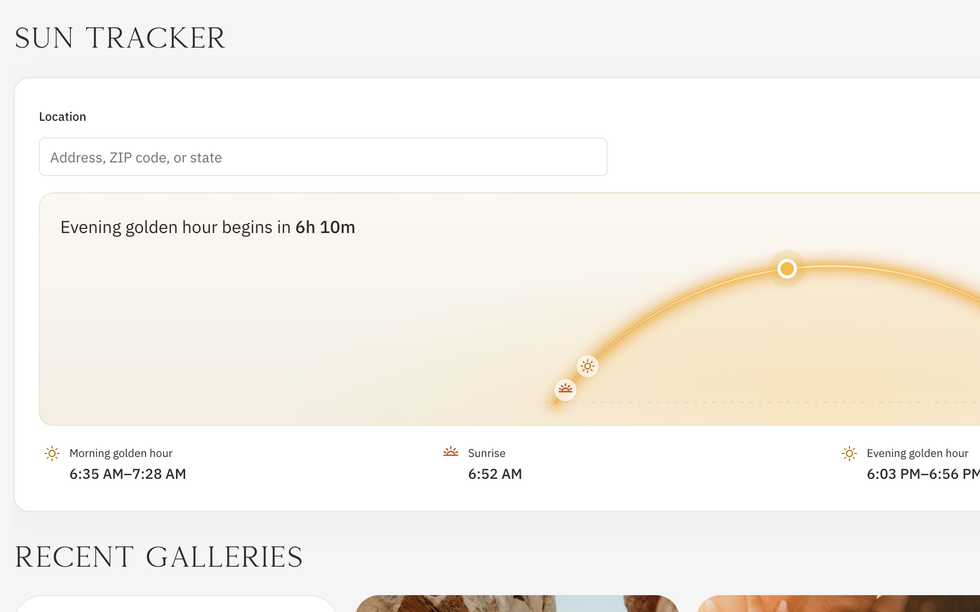
✓Event timelines with drive and leave-by times, day-of run sheets, and sunrise, sunset, and golden-hour context.
Job workflows with stages, to-dos, automated emails, contracts, and questionnaires.
Plan structure
✓Every live feature on every standard plan, from $35 per month; plans differ by storage. 30-day free trial.
Starter, Pro, and Master plans from US$16 per month, varying by users, brands, booking forms, active jobs, and automations. 7-day free trial.
See the difference yourself—every feature, 30 days free, no card.
Studio Ninja keeps jobs moving. Vignette keeps the gallery, the crew, and the money on the same booking—so there is no partner app to reconcile.
01 · IN THE APP
Galleries that stay with the story
Deliver a branded gallery with albums, favorites, watermarks, and download limits—still attached to the client and booking that created it.
Cover, albums, favorites, and client preview
Private links, watermarks, and download limits
Expiration and reactivation controls
Client gallery
02 · IN THE APP
Your crew, paid and in the loop
Assign second shooters with roles and hourly rates, send role-based agreements and invites, collect RAWs, and pay contractors through Stripe—without a spreadsheet.
Roles, rates, and estimated pay per booking
Team contracts by role
RAW requests and contractor payments
Booking · Team
03 · IN THE APP
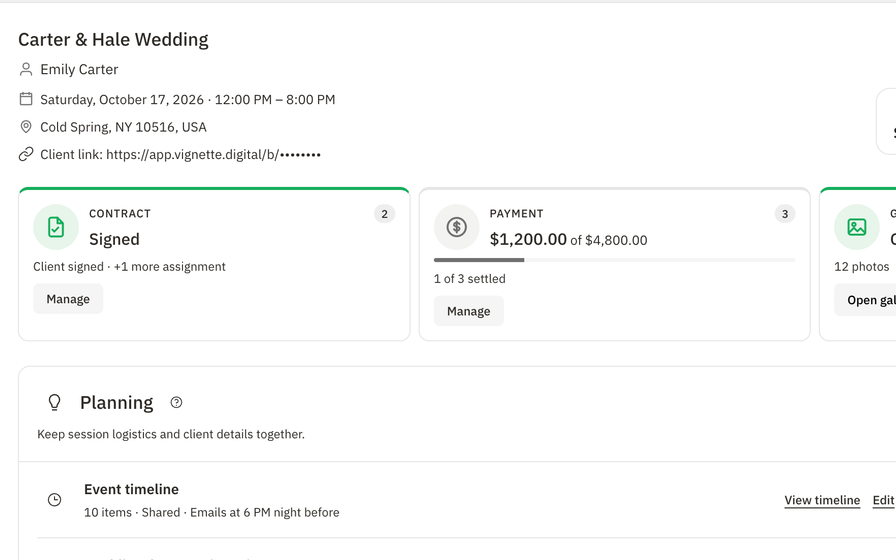
Payment plans without the chase
Split the job into a retainer and installments, record checks and cash, and send reminders in a click. Your client sees exactly what is paid and what is due.
Retainer and installment schedules
Record, waive, refund, and remind
Finance and tax set-aside views
Booking · Payment plan
04 · IN THE APP
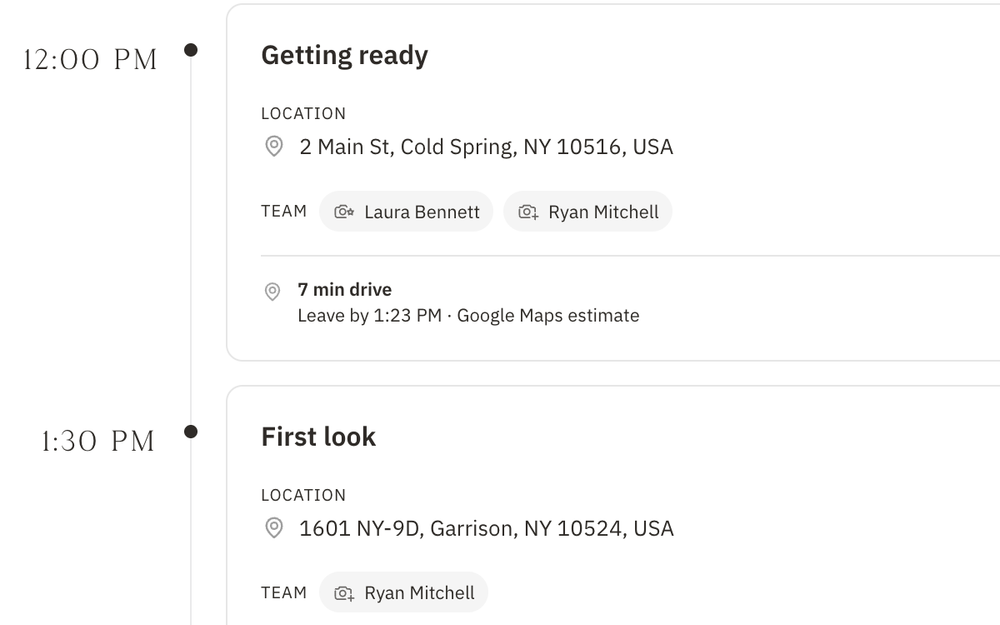
Shoot day, already figured out
Build the timeline, put your second shooter on the right moments, and let Vignette work out drive times and when to leave. The run sheet goes to your client and crew the night before.
Drive time and leave-by times between verified addresses
Team assignments on every moment
Run sheet emailed automatically the night before
Booking · Event timeline
One booking. Gallery, crew, and money included.
Bring your clients, publish a package, and deliver the gallery from the same place you booked the job. One login, every feature.
Switching from Studio Ninja is easier than you think.
Keep Studio Ninja running while you try Vignette. Move your next booking first and bring the rest over when you are ready.
01 · START
Open your free studio.
30 days, every feature, no credit card. Add your studio name, logo, and location.
02 · IMPORT
Bring your clients with you.
Import contacts from a CSV or JSON export. Vignette previews the import and flags likely duplicates before anything is created.
03 · REBUILD
Set up your packages and contract.
Create reusable packages and a contract template from clauses and merge fields once, then reuse them on every booking.
04 · BOOK
Run your next booking in Vignette.
Publish your storefront or send the booking link, and let the contract, payment plan, timeline, and gallery follow it.
05 · WHAT IS INCLUDED
Vignette capabilities to evaluate
Vignette is a Studio Ninja alternative for photographers who want galleries, crew, and studio finance inside the same system as the client and booking. Studio Ninja manages jobs, workflows, contracts, and invoices, and connects to partner apps for galleries and accounting. Vignette builds those pieces in natively.
✓Photography CRM and contact import
✓Packages, storefront, full sessions, and mini sessions
✓Contracts, e-signatures, retainers, and installments
✓Native branded client galleries and favorites
✓Watermarks, downloads, expiration, and lifecycle controls
✓Second-shooter roles, rates, agreements, and payouts
✓Timelines with drive times and day-of run sheets
✓Sunrise, sunset, and golden-hour planning
✓Payments, payouts, expenses, profit, and tax set-aside views
✓Every live feature on every standard plan
06 · THE HONEST FIT
Choose the fit. Not the pitch.
VIGNETTE MAKES SENSE FOR
Photographers who want client galleries without a separate gallery subscription
Studios that book second shooters and want rates, agreements, and payouts on the booking
Owners who want expenses and profit beside revenue, not in a separate accounting app
LOOK CLOSELY IF YOU NEED
Photographers who want the lowest entry price and only need a few active jobs at a time
Studios that rely on native iOS and Android apps, workflow automations, or Xero and QuickBooks integrations
Photographers already committed to ShootProof or Pic-Time galleries who only need job management around them
What Vignette does not pretend
Vignette runs in the browser and does not currently advertise native iOS or Android apps, broad workflow automations, or Xero and QuickBooks integrations.
Studio Ninja’s entry plan costs less than Vignette’s standard plans, though it limits users, booking forms, and active jobs.
Competitor features and prices can change. Verify current details on Studio Ninja’s official pages before purchasing.
Not natively. Studio Ninja’s help center says it leaves galleries to partner services and integrates with ShootProof and Pic-Time. Vignette includes branded client galleries in every plan, attached to the booking.
Is Vignette better than Studio Ninja for a studio with second shooters?
Vignette is built for it: second-shooter roles, reusable rates, role-based agreements, RAW requests, and contractor payments live on the booking. Studio Ninja’s documentation describes additional users with full account access and no permission controls.
Which is cheaper, Vignette or Studio Ninja?
Studio Ninja’s Starter plan costs less, at US$16 per month, but limits users, booking forms, and active jobs, and galleries require a separate service. Vignette standard plans start at $35 per month with every live feature, including galleries.
Can I move from Studio Ninja to Vignette?
Yes. Import your client list into Vignette from a CSV or JSON file; Vignette previews the import and flags likely duplicates before anything is created. You can keep Studio Ninja running while you move your next booking first.
How much does Vignette cost?
While the limited Unlimited offer lasts, Vignette is $35 per month with unlimited cloud storage after a 30-day free trial. The standard plans are Capture at $35 per month with 250 GB cloud storage and Focus at $50 per month with 1 TB cloud storage. Every plan includes every feature.
Do I need a credit card to start the free trial?
No. The 30-day free trial includes every feature and does not require a credit card to start.
Can I bring my existing clients with me?
Yes. Import contacts from a CSV or JSON file. Vignette previews the import and flags likely duplicates before anything is created.
08 · MORE COMPARISONS
Weighing other options too?
See how Vignette stacks up against the other tools photographers ask us about most.